


Verto Software Key Manager PRO for WooCommerce
Managing software license keys in a single WooCommerce store is relatively straightforward. But once a business operates multiple storefronts, license inventory, delivery and customer support can quickly become fragmented.
The same software product may be sold through different domains, country-specific stores or brands. Each store can have its own products, SKUs, customers and orders, while license keys can be supplied from one central inventory or managed locally by each store.
Verto Software Key Manager PRO is designed for this type of multi-store environment. It connects WooCommerce storefronts to a central Master Store while supporting both independent WooCommerce installations and multi-domain storefront setups such as WPML.
Products can use centralized Master Delivery or the Connected Store’s own Local Delivery, with the delivery source selected separately for each product. PRO also provides centralized delivery history, SKU mapping, inventory management and integrated Support Cases for handling license-related customer issues across the store network.
How Centralized WooCommerce License Key Management Works
Verto Software Key Manager PRO uses a Master Store and Connected Store architecture. One WooCommerce installation acts as the Master Store, providing centralized license key inventory to multiple WooCommerce storefronts.
Independent Connected Stores remain separate WordPress and WooCommerce installations with their own domains, products, customers, orders and branding. PRO also supports multi-domain storefront setups such as WPML, where multiple storefront domains can operate through the same WordPress and WooCommerce installation.
This allows businesses to manage license distribution centrally across different storefronts without requiring every store to share the same WooCommerce installation or product structure.
For each product, the license source can be defined separately. Master Delivery uses license keys from the centralized Master Store inventory, while Local Delivery uses the Connected Store’s own license inventory. This means a single WooCommerce order can even contain products supplied from both sources.

Centralized License Key Inventory
With Verto Software Key Manager PRO, the Master Store acts as the central license key inventory for software products sold across multiple WooCommerce storefronts.
Instead of maintaining separate pools of the same license keys across different stores, products using Master Delivery can draw their keys from one shared Master inventory. When a Connected Store receives an order, PRO requests the required key from the Master Store and records the delivery centrally.
The inventory shows the available license keys for each product together with its delivery history and low-stock status. License keys can be added and managed centrally, while individual products can still use Local Delivery when a store needs to maintain its own inventory.
This makes it possible to centralize license stock where it makes sense without forcing every product or storefront to use the Master inventory.
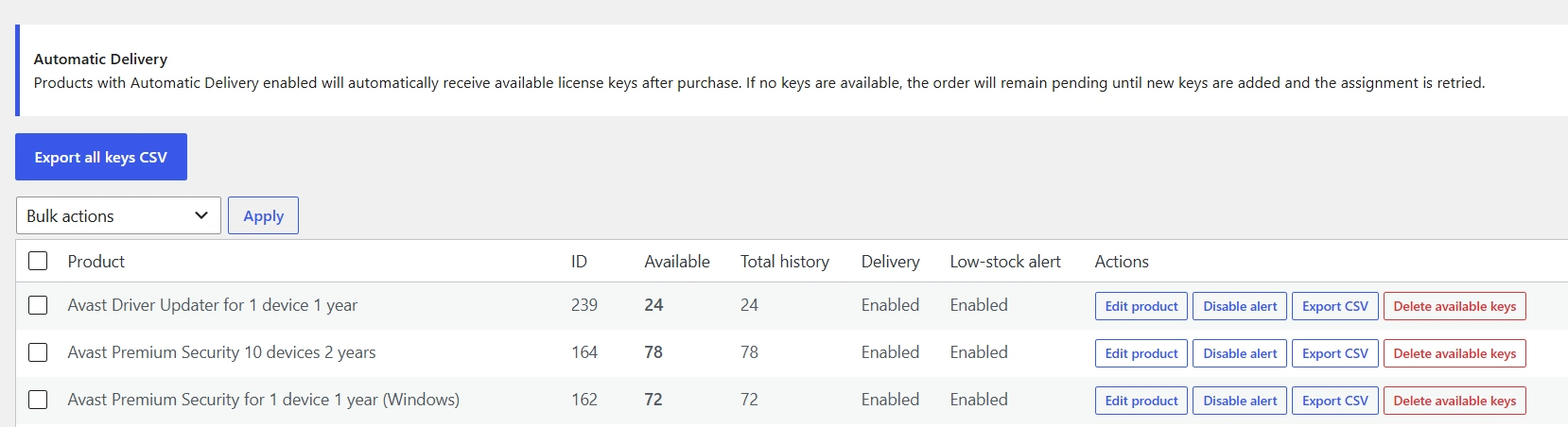
Master Delivery and Local Delivery
Not every product in a Connected Store needs to use the central Master inventory. Verto Software Key Manager PRO allows the delivery source to be selected separately for each product.
With Master Delivery, the license key is supplied from the Master Store’s central inventory. This is useful when the same software products are sold through several storefronts and should draw from one shared pool of license keys.
With Local Delivery, the Connected Store uses its own Verto license inventory instead. This allows individual stores to sell products that are managed locally — including products that do not exist in the Master Store at all.
The two inventory sources remain separate. Master Delivery does not automatically fall back to Local Delivery, and Local Delivery does not automatically use Master inventory. This keeps license sourcing predictable and prevents keys from being taken from an unintended inventory.
Because the delivery source is selected at product level, the same WooCommerce order can contain both Master Delivery and Local Delivery products. PRO automatically handles each product using its configured inventory source.
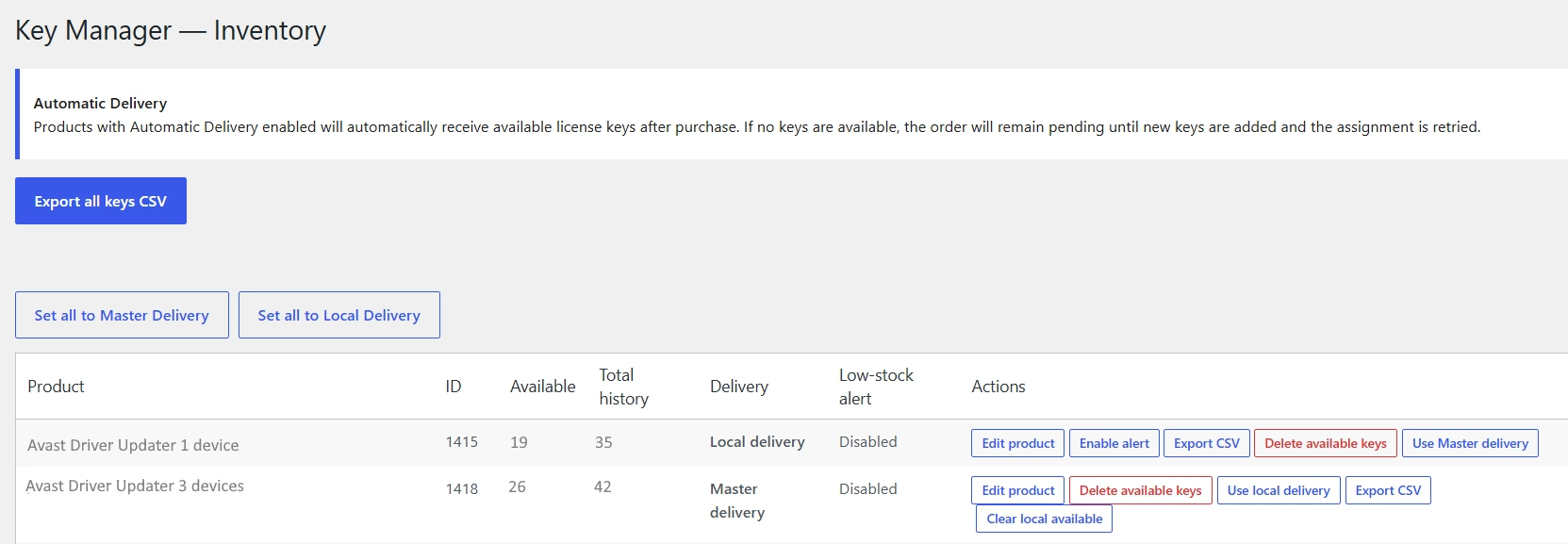
Automatic License Key Assignment and Delivery
Once a delivery source has been defined, Verto Software Key Manager PRO handles license assignment as part of the WooCommerce order workflow.
When the required inventory is available, license keys can be assigned and delivered automatically to the customer. Products using Master Delivery receive their keys from the Master Store, while products using Local Delivery are fulfilled from the Connected Store’s own inventory.
The assigned license information is recorded with the order and included in the customer delivery workflow, while the corresponding inventory is updated automatically. This allows the storefront to remain independent while license fulfillment is handled from the correct inventory source.
Mixed Master and Local Delivery in the Same WooCommerce Order
A single WooCommerce order can contain products using different license inventory sources.
For example, one product can receive its license key from the centralized Master Store inventory, while another product in the same order is fulfilled from the Connected Store’s Local inventory.
Verto Software Key Manager PRO handles both delivery sources within the same order. Before license keys are consumed, the system checks that the required inventory is available for the complete fulfillment operation. This helps prevent partial license delivery when one of the required inventory sources is unavailable.
When the required keys are available, license keys from both inventory sources are assigned to the appropriate products and delivered to the customer as part of the same WooCommerce order.

Inventory Protection When License Keys Are Unavailable
Automatic license delivery also needs to handle situations where the required inventory temporarily runs out.
Verto Software Key Manager PRO performs an all-or-nothing inventory check before consuming license keys for an order. If all required keys are not available from their selected inventory sources, the system does not partially fulfill the license delivery.
For example, if an order contains one Master Delivery product and one Local Delivery product, but the Master Store has no available key for its product, the Local key is not consumed either. This prevents a customer from receiving only part of the required license delivery.
If the order cannot be fulfilled because the required inventory is unavailable, the store administrator can be notified with details about the missing license keys. The order remains in Processing, and after the inventory is replenished, license assignment can be retried.

Centralized Buyers & License Delivery History
As license delivery expands across multiple WooCommerce storefronts, keeping track of customers, orders and delivered license keys becomes increasingly important.
Verto Software Key Manager PRO provides a centralized Buyers & Keys view on the Master Store. It brings together license delivery history from across the connected store network and provides an overview of buyers, orders, delivered keys and participating storefronts.
Administrators can search the history and filter records by store, product and date range, making it easier to locate a specific customer, order or license delivery. Filtered records can also be exported to CSV when the data is needed outside WordPress.
Individual buyer details provide access to the related store, WooCommerce order, product, SKU, delivered license key and delivery status. Where supported, license-related customer issues can also be handled directly from the history through the integrated support workflow.
Connected Stores continue to retain their own WooCommerce orders and local records. The Master Store history provides a centralized operational view without replacing the underlying WooCommerce order data on each storefront.
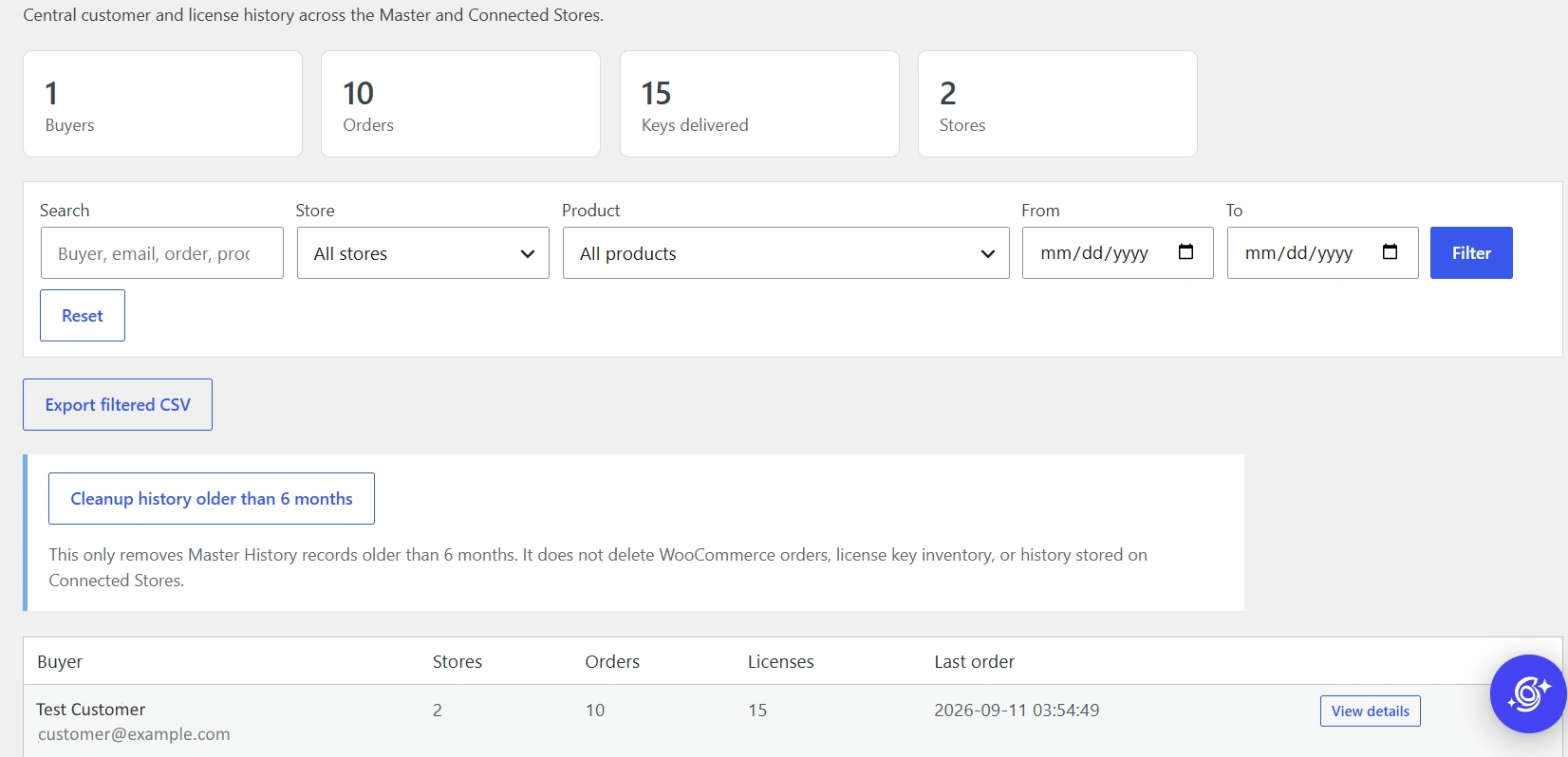
Detailed License Delivery Records
Each buyer’s history can be opened for a detailed view of license delivery activity. From one central location, administrators can review the related store, WooCommerce order, product, SKU, delivered license key, delivery source and status.
The Source column identifies whether a license key was supplied from the Master Store or from a Connected Store’s Local inventory. This makes it easy to trace where each delivered key originated across the connected store network.
The detailed history also provides quick access to the related WooCommerce order, allows administrators to copy delivered license keys, and integrates with the PRO support workflow when a replacement key needs to be issued.

Customer License Support and Replacement Workflow
Verto Software Key Manager PRO includes an integrated support workflow for license-related customer issues. Support requests remain linked to the relevant WooCommerce order, product and delivered license key, making it easier to identify the affected license and handle the issue from the correct store.
The workflow covers the complete process from reporting a license problem to reviewing technical evidence and, when necessary, issuing a replacement license key.
Report a Problem Directly from the WooCommerce Order
After license keys have been delivered, customers can access a Report a problem option for the relevant licensed product from their WooCommerce order.
Each support action is linked to the specific product and delivered license key. This means the customer does not need to manually identify which order or license the request belongs to, and multiple licensed products in the same order can be handled separately.
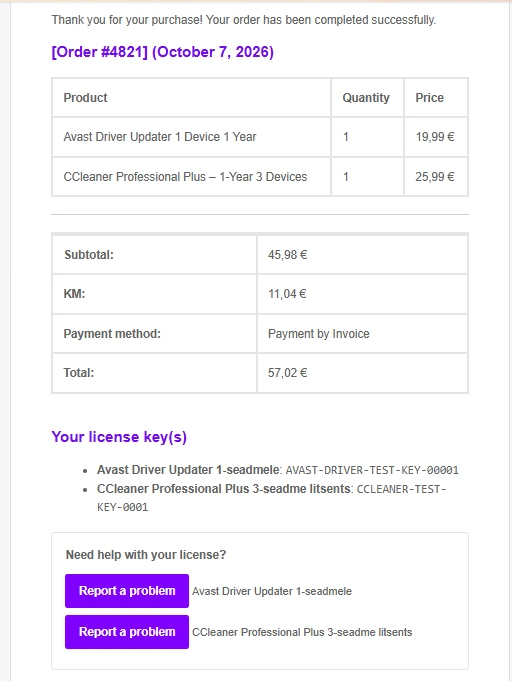
Submit Error Details and Technical Information

Windows Inspector for Easier License Support
SoftwareHouse Windows Inspector is a free Windows diagnostic tool designed to make software license support easier.
When a customer experiences an activation, installation or compatibility issue, Windows Inspector can collect relevant Windows, licensing, hardware, Microsoft Office and network information into a single diagnostic report.
Instead of uploading a separate System Information screenshot, the customer can download Windows Inspector directly from the Report a problem form, run it, click Copy Report, and paste the report into the support request.
This gives the store administrator useful technical information alongside the error code and problem description, helping diagnose activation and system-related issues more efficiently.
Windows Inspector is free to download and use.
Manage Support Cases from WordPress
Submitted requests appear in the Support Cases area of Verto Software Key Manager PRO. Administrators can see the case ID, originating store, WooCommerce order, customer, product, SKU, error code and current case status from one central view.
When a new support case is submitted, a notification is also sent to the configured support notification email, including the main case details and a direct link to the case in WordPress admin. The notification address can be configured directly from the Support Cases page.

Automatic License Key Replacement from Inventory
If an assigned license key needs to be replaced, the administrator can replace it directly from the Buyers & Keys history. Verto Software Key Manager PRO automatically selects the next available license key for the same product/SKU, assigns it to the customer and sends the replacement by email.
The original key remains in the delivery history and is marked as replaced together with the reported error code. This preserves the replacement history and allows a replacement key to be replaced again if necessary.

Send an External Replacement Key from a Support Case
Not every replacement license needs to come from the existing Verto inventory. If a new license key is obtained separately — for example, as a replacement from the software supplier — it can be sent directly to the customer from the related Support Case.
The administrator can first mark the case as Replacement requested while waiting for a new key. Once the replacement is available, it can be entered into the case and sent directly to the customer by email.
This replacement key is stored only with the Support Case. It does not replace or modify the original license assigned to the WooCommerce order, and it does not alter the original inventory record. This keeps the original license delivery history intact while still recording the replacement used to resolve the support case.

SKU Mapping Between WooCommerce Stores
Connected Stores and the Master Store do not need to use identical SKUs for the same product.
With SKU Mapping, a product in a Connected Store can be linked to the corresponding product in the Master Store even when each store uses a different SKU structure.
This is particularly useful for existing WooCommerce stores, localized product catalogs, country-specific storefronts, multi-domain setups and different brands. A business can keep its established product identifiers instead of rebuilding every store around the Master Store’s SKU structure.
For example, a product could use A-DU-1D-1Y in the Master Store and AV-DU-1S-1A in a Connected Store. SKU Mapping allows PRO to associate the two products for centralized license delivery.

Independent WooCommerce Stores, One Central License Inventory
Connected Stores do not need to be part of the same WordPress installation, domain or brand.
Each Connected Store can operate as a fully independent WooCommerce shop with its own domain, product catalog, customers, orders and branding, while Verto Software Key Manager PRO connects it to the Master Store for centralized license delivery where required.
This makes the architecture suitable for businesses that operate several online stores without forcing those stores into a single WooCommerce installation.
Practical Use Cases
- Multiple country storefronts – country-specific storefronts can operate across independent WooCommerce installations or multi-domain setups while using centralized license inventory.
- Different brands – independently branded stores can connect to the same Master Store.
- Existing WooCommerce stores – stores can retain their own products and SKU structures while using centralized delivery.
- Supplier and reseller networks – independent WooCommerce stores can receive license keys from a central supplier inventory.
- Mixed product catalogs – some products can use Master Delivery while others remain entirely local to the Connected Store.
Secure Communication Between Master and Connected Stores
Verto Software Key Manager PRO provides a secure communication layer between the Master Store and authorized Connected Stores.
Each Connected Store is explicitly authorized using a unique connection code generated by the Master Store. Once connected, the store can request license keys and exchange the information required for centralized license delivery.
The connection can be verified using the built-in Safe Test, which checks REST API access and validates the connection code without requesting or reserving a license key.
Connected Stores remain independent WooCommerce installations. The connection is used only for the communication required by Verto Software Key Manager PRO and does not merge the stores, customers, orders or WordPress installations.

Connected Store Production Readiness
On the Connected Store, Verto Software Key Manager PRO verifies that the components required for Master Delivery are configured and ready before the store begins requesting license keys from the Master Store.
The Production Readiness check confirms that the Verto Software Key Manager base plugin is ready, the Master Store URL and connection code are configured, and the automatic WooCommerce order provider is available.
Once these requirements are met, eligible WooCommerce orders can automatically request license keys from the configured Master Store. The Connected Store remains an independent WooCommerce installation, while the local Verto Software Key Manager continues to handle the WooCommerce-side assignment and customer delivery workflow.

For products using Master Delivery, PRO requests the key from the Master Store by SKU. Products using Local Delivery continue to use the Connected Store’s own inventory.
Built on Verto Software Key Manager for WooCommerce
Verto Software Key Manager PRO works together with the free Verto Software Key Manager for WooCommerce plugin.
The free plugin is not a trial or limited demo. It is a standalone solution for managing license key inventory and automatic customer delivery on one storefront domain per WooCommerce installation. WPML translations within the same WooCommerce installation are supported. Separate storefront domains count individually toward the PRO storefront domain limit.
PRO extends this foundation with centralized multi-store and multi-domain functionality, supporting both independent WooCommerce installations and multiple storefront domains while retaining the option to use Master or Local Delivery per product.
This means a store can begin with local license management using the free plugin and add PRO when centralized multi-store license management is needed.
Verto Software Key Manager for WooCommerce is available free from WordPress.org.
Choosing the Right Verto Software Key Manager PRO License
All Verto Software Key Manager PRO plans provide the same core multi-store license management architecture. The main difference is the number of storefront domains covered by the license.
Choose the plan based on the number of storefront domains that will use PRO. Each storefront domain counts toward the license limit, whether it belongs to an independent WooCommerce installation or is part of a multi-domain setup such as WPML.
Verto Software Key Manager PRO 3
A practical choice for businesses managing up to three storefront domains across independent stores, country-specific shops or multi-domain setups.
View PRO 3 →Verto Software Key Manager PRO 10
Designed for larger multi-store operations, multiple brands, country-specific storefronts or multi-domain setups using centralized license management.
View PRO 10 →Verto Software Key Manager PRO Unlimited
Designed for larger store networks, multiple brands and international storefront environments that need the flexibility to add storefront domains without a domain limit.
View PRO Unlimited →Upload and Manage WooCommerce License Keys
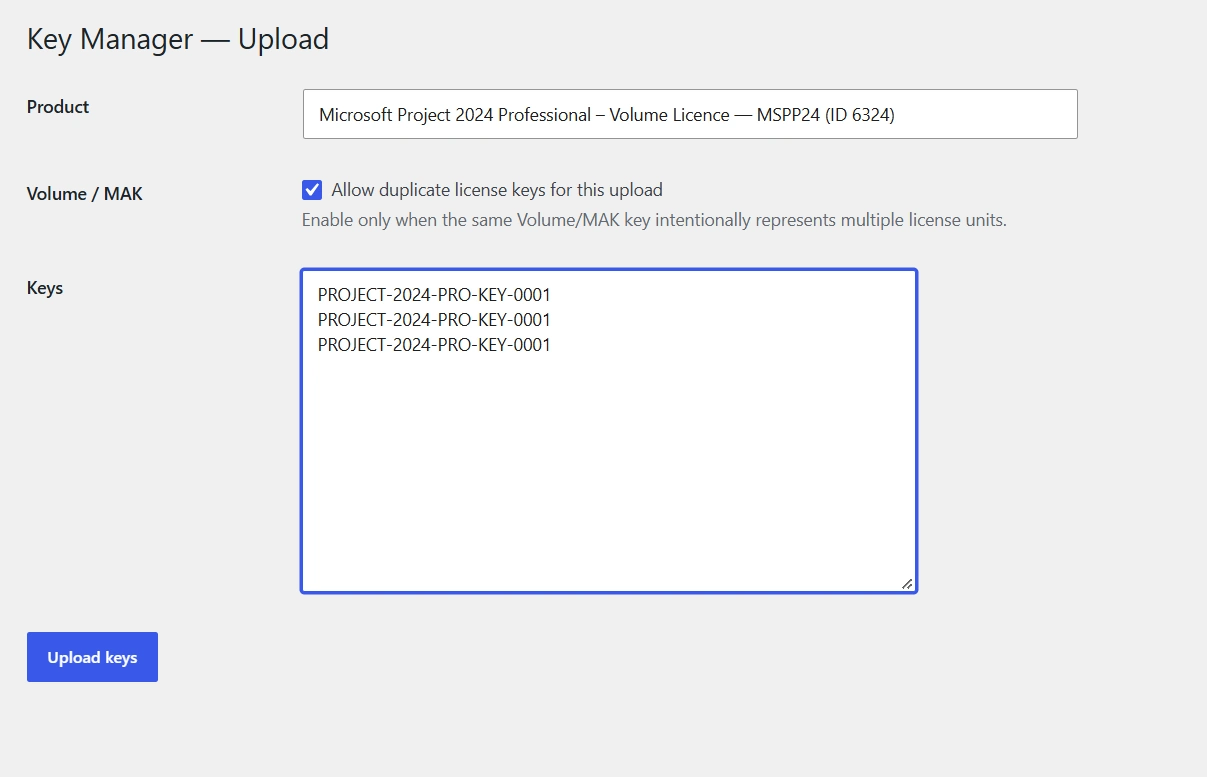
License keys can be added directly to the inventory by searching for a WooCommerce product by name, SKU or product ID.
One or multiple license keys can be entered and uploaded at once. Multiple keys can be separated by lines, commas or semicolons.
For standard license keys, duplicate keys are prevented by default. Each uploaded key represents an individual license unit available for assignment and delivery.
Volume / MAK licenses are also supported. When the same Volume or MAK key intentionally represents multiple license units, enable Allow duplicate license keys for this upload. The same key can then be uploaded multiple times, with each entry representing one available license unit.
For example, if one MAK key may be sold or assigned three times, enter the same key three times and enable the duplicate-key option. Verto Software Key Manager will then track these as three available license units while retaining the same license key value.
Keys can be added to both Master Store and Local Store inventories. Products using Master Delivery receive their keys from the centralized Master inventory, while products using Local Delivery use the Connected Store’s own inventory.
Once uploaded, the license units become available for automatic assignment and delivery when the corresponding product is purchased.
Low-Stock Alerts and Automatic Order Completion
Verto Software Key Manager can monitor the available license inventory and notify the store administrator when the number of available keys falls below a defined threshold.
The alert threshold and notification email can be configured in the plugin settings.
The plugin can also automatically complete WooCommerce orders once all required license keys have been successfully assigned. If there are not enough keys available, the order remains Processing until the missing inventory is added and license assignment is retried.

Built for Real Multi-Store WooCommerce Operations
Verto Software Key Manager PRO brings license inventory, automated delivery, customer history and license support together across independent WooCommerce stores and multi-domain storefront setups.
Each product can use either Master Delivery or Local Delivery, allowing a business to centralize selected license inventory while keeping other products managed locally. Both delivery sources can also be used within the same WooCommerce order.
From automatic license assignment and inventory protection to Volume / MAK license units, SKU Mapping, low-stock alerts, centralized Buyers & Keys history and integrated customer support, Verto Software Key Manager PRO is designed to reduce manual license management as the number of storefronts grows.
See on minu meelest parem kui praegune, sest nüüd võtab kokku ka äsja lisatud Volume / MAK funktsiooni ning kasutab läbivalt samu termineid Master Delivery / Local Delivery.
Frequently Asked Questions
Can I manage license keys across multiple WooCommerce stores?
Yes. Verto Software Key Manager PRO connects independent WooCommerce stores to a central Master Store. Products can receive license keys from the Master inventory or continue using inventory stored locally on the Connected Store.
What is the difference between Master Delivery and Local Delivery?
Master Delivery supplies the license key from the centralized inventory on the Master Store. Local Delivery uses the Connected Store’s own license key inventory.
Can Master Delivery and Local Delivery be used in the same order?
Yes. A single WooCommerce order can contain both Master Delivery and Local Delivery products. Before consuming any keys, PRO checks that the required inventory is available for the complete order.
Can I choose the delivery source separately for each product?
Yes. Master Delivery or Local Delivery can be selected separately for each product, allowing centralized and local inventory to be used within the same store.
Do multiple domains or WPML storefronts count separately?
Yes. Each storefront domain using PRO counts individually toward the PRO storefront domain limit, including storefront domains belonging to the same WooCommerce installation through WPML or another multi-domain setup.
Does each Connected Store count as one license slot?
Not necessarily. Licensing is based on storefront domains, not simply the number of Connected Stores or WordPress installations. If one installation operates multiple storefront domains, each storefront domain counts individually.
How many storefront domains can I use?
PRO 3 supports up to 3 storefront domains, PRO 10 supports up to 10 storefront domains, and PRO Unlimited supports an unlimited number of storefront domains.
Can Connected Stores use different SKUs?
Yes. SKU Mapping allows a product SKU on a Connected Store to be mapped to the corresponding Master Store SKU. This is useful for existing stores, localized catalogs and different product structures.
Does the Master Store need to sell the same products as the Connected Stores?
No. Connected Stores remain independent WooCommerce stores with their own products and catalogs. SKU Mapping can associate Connected Store products with the appropriate Master products where centralized delivery is required.
Can I upload license keys to both Master and Local inventory?
Yes. License keys can be maintained in the centralized Master inventory as well as in the individual inventories of Connected Stores.
Can the same Volume or MAK key represent multiple license units?
Yes. For Volume / MAK licenses, the Allow duplicate license keys for this upload option allows the same key to be entered multiple times intentionally. Each entry represents one available license unit while retaining the same key value.
What happens if there are not enough license keys?
PRO performs an all-or-nothing inventory check before consuming keys. If the required inventory is unavailable, the order is not partially fulfilled. It remains in Processing until inventory is replenished and license assignment is retried.
Does Verto Software Key Manager automatically deliver license keys to customers?
Yes. When the required inventory is available, license keys can be automatically assigned and included in the WooCommerce customer delivery workflow.
Can I see which customer received each license key?
Yes. The Buyers & Keys history provides centralized visibility into customers, orders, products, license keys, stores and delivery sources.
Can I export license delivery history?
Yes. The centralized Buyers & Keys history can be filtered and exported as a CSV file.
Can I receive alerts when license key inventory is running low?
Yes. A low-stock threshold and notification email can be configured in the plugin settings.
Can customers report problems with a delivered license?
Yes. Customers can open a Report a problem form for a delivered license and provide an error code, description and technical evidence. They can upload screenshots or provide a diagnostic report from SoftwareHouse Windows Inspector.
Can I send a replacement license key to a customer?
Yes. An administrator can automatically assign the next available key for the same product/SKU from inventory. A separately obtained replacement key can also be sent from the related Support Case without modifying the original inventory or order-license record.
Is the FREE Verto Software Key Manager plugin required?
Yes. Verto Software Key Manager PRO works together with the free Verto Software Key Manager for WooCommerce plugin, which provides the underlying local inventory, assignment and delivery functionality.
Is the free plugin only a trial?
No. The free plugin is a standalone solution for managing license key inventory and automatic customer delivery on one storefront domain per WooCommerce installation. PRO adds centralized multi-store and multi-domain functionality.
Can I use WPML with the FREE version?
Yes. WPML translations within the same WooCommerce installation are supported. When multiple storefront domains are used, each storefront domain counts individually toward the PRO storefront domain limit.
Can I use Verto Software Key Manager with existing WooCommerce products?
Yes. Existing WooCommerce products can be used. Products can be found by name, SKU or product ID when adding license keys, and PRO can use SKU Mapping when Connected Store and Master Store product identifiers differ.
